


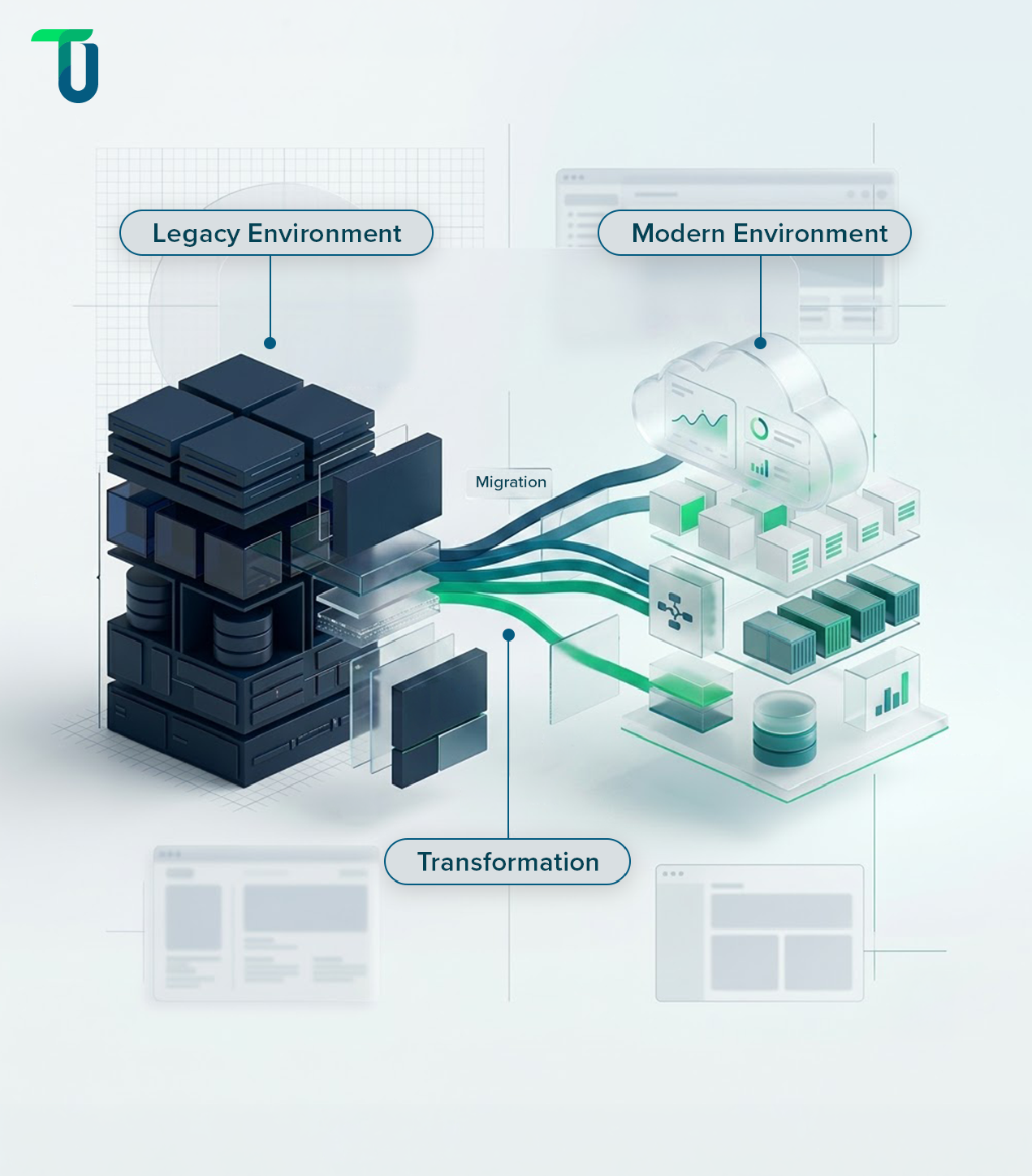
As technology evolves, legacy systems quickly become costly, outdated, and difficult to maintain. To stay competitive, enterprises need a clear legacy modernization strategy or application migration strategy supported by expert digital transformation consulting services. Legacy modernization focuses on upgrading applications, IT infrastructure, and processes using application modernization services like re-platforming or re-architecting. In contrast, legacy migration moves data and applications to modern platforms, often with application migration software and cloud solutions such as AWS, Microsoft Azure, or Google Cloud. While both approaches improve performance, security, and scalability, they are complex and come with risks like downtime, data loss, and compatibility issues. Following proven legacy system modernization strategies and avoiding common pitfalls ensures a smoother transition. In this blog, we’ll cover the best practices for legacy modernization and migration and the common challenges enterprises must overcome to achieve successful digital transformation.
What Are Legacy Modernization Services and Why Do Businesses Need Them?
Most legacy modernization programs don't fail in production. They fail in the planning room, when teams assume that deploying a modern platform is the same thing as solving the business problem underneath it. That assumption has a name: the digital fallacy. And it's the reason enterprises spend millions on new systems that replicate the same broken workflows in a newer interface.
The data supports this pattern. More than 70% of organizations report that their digital transformation initiatives lose momentum or stall before delivering the expected business impact, with most failures caused by organizational and planning issues rather than technology limitations. Likewise, Gartner advises enterprises to treat legacy modernization as a strategic business initiative involving executive stakeholders, governance, and measurable business outcomes—not simply an IT upgrade.
The organizations that get legacy modernization right treat it as a business transformation initiative with a technology execution layer, not the other way around. This blog covers what that actually means: how to build the business case, what the best practices look like in practice, where AI genuinely accelerates the work, which pitfalls consistently derail enterprise programs, and how to choose a partner who can deliver at your scale.
Legacy Modernization and Migration: What Enterprises Need to Know
Legacy modernization and legacy migration are related but distinct. Modernization improves an existing system in place, through refactoring, replatforming, or adding a modern integration layer without replacing the core. Migration moves data, workloads, or applications from one environment to another, typically to a cloud platform like AWS, Microsoft Azure, or Google Cloud. In practice, most enterprise programs involve both, with migration serving as the path and modernization determining what arrives at the destination.
The business case for legacy modernization services is no longer about whether to modernize. Analysts at Gartner, Forrester, and McKinsey & Company consistently identify legacy infrastructure as a primary constraint on digital transformation. The real question is what the modernization program is being designed to fix.
A well-structured business case covers four outcomes:
- Cost reduction: Aging systems carry disproportionate maintenance costs, often requiring specialized skills for platforms that vendors no longer actively support.
- Security posture: Legacy systems accumulate unpatched vulnerabilities over time. Modernization is the structural fix, not a temporary patch.
- Compliance simplification: Regulations like HIPAA, PCI-DSS, SOX, and CCPA require controls that older architectures cannot consistently enforce without manual intervention.
- Operational scalability: Systems built for a previous scale of the business become bottlenecks as data volumes, user counts, and transaction rates grow.
Here's the risk most executives don't name explicitly before committing: the digital fallacy. It's the assumption that procuring and implementing a modern platform will resolve the underlying business problem without changing the processes and governance structures around it. Organizations that migrate broken workflows into a new system end up with the same operational problems, running on more expensive infrastructure. The business case must specify what changes in operations, not just what changes in technology, to be credible.
Building the agility modern enterprises need starts with a clear-eyed view of what the legacy system is actually costing the business today, measured in dollars, risk exposure, and competitive velocity. Organizations that skip that accounting consistently underestimate the total cost of the modernization program because they never fully priced the cost of staying still.
8 Legacy Modernization and Migration Best Practices for Enterprise Success
The difference between a modernization program that delivers and one that stalls is rarely technical. It's structural. These practices separate programs that finish from programs that drift.
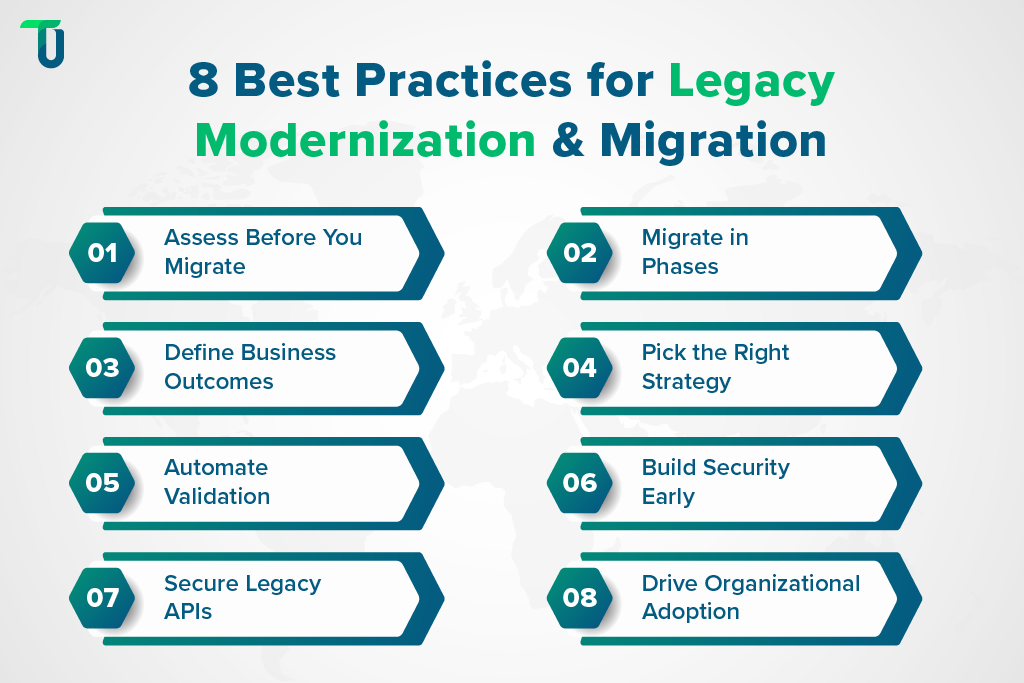
1. Map Every Application, Dependency, and Integration Point Before Moving Anything
A static analysis of your environment, using tools like SonarQube or AWS Application Discovery Service, surfaces the hidden dependencies that create post-migration failures. Systems that appear standalone often have undocumented integrations to billing platforms, reporting databases, or third-party APIs. Teams that skip this step discover those connections after cutover.
2. Migrate Incrementally. Never Big Bang.
Big bang migration, moving everything to the new environment in a single cutover, is the most common cause of timeline failure and data integrity issues in large enterprise programs. A phased approach modernizes one high-impact, lower-risk system first to prove the methodology, surface tooling gaps, and build organizational confidence before scaling. Every subsequent phase benefits from what the pilot exposed.
3. Define Goals in Business Outcomes, Not Technical Specifications
Measurable targets like reducing infrastructure costs by 25%, improving transaction processing time, or achieving 99.9% uptime give the program a success metric that survives leadership changes and scope discussions. Targets framed only in technical terms create accountability for the activity, not the outcome. Align modernization with your broader digital transformation strategy from the outset, not after the architecture is already decided.
4. Choose the Right Approach Per Application
Not every system needs a full rebuild. The right approach depends on each system's business criticality, technical debt load, and integration complexity:
- Rehosting: moves applications to the cloud with minimal code changes; fastest path to infrastructure savings
- Replatforming: adjusts configurations for a managed cloud environment without rewriting logic
- Refactoring: restructures code to reduce technical debt while preserving core functionality
- Rearchitecting: rebuilds for cloud-native microservices; highest effort, highest long-term flexibility
- Retiring: decommissions systems that have no active users or business justification
5. Automate Testing and Validation at Every Stage
Manual validation at scale is where programs slow down. Automated regression testing, security scanning inside CI/CD pipelines for continuous improvement, and layered data validation on migrated data catch issues before they reach production. Use checksum verification alongside row-count checks, sample-based semantic validation, and business-rule-level audits. The earlier in the process automation runs, the less expensive the fix.
6. Plan for Security and Compliance from Day One
Security engineered in after migration is always more expensive than security designed in before it. A compliance-first cloud migration strategy establishes zero-trust frameworks, role-based access controls, and audit logging before any data moves. This matters especially for regulated industries where a compliance gap in the new environment can block go-live.
7. Secure APIs Before Connecting Legacy Systems to Modern Platforms
APIs bridging legacy systems to modern platforms are a frequent attack surface because legacy auth methods were not designed for the threat landscape modern systems face. Three controls apply before any legacy-to-modern API connection goes live:
- API gateways aligned to a zero-trust architecture: Enforce authentication and authorization at every call, not just at the perimeter, as part of a broader least-privilege, identity-aware design.
- Credential rotation schedules: Eliminate long-lived tokens that legacy systems commonly rely on.
- Rate limiting: Protect unpatched legacy endpoints from exploitation during the transition window.
8. Apply Organizational Change Management (OCM) from the Start
OCM is the structured discipline for managing how people, processes, and governance adapt to a major system change. It covers four phases:
- Planning: define objectives, roles, and responsibilities before the program begins
- Communication: explain the change, its benefits, and its impact to every affected team
- Implementation: execute the change plan, train users, and monitor adoption
- Evaluation: review KPIs, gather feedback, and refine the rollout based on what the data shows
Enterprises that treat OCM as an afterthought, onboarding users after the system is live, consistently experience lower adoption rates and higher support costs in the first year. Stakeholder alignment needs to start in the planning phase, not the training phase.
The technical execution of a modernization program only succeeds if the organizational infrastructure around it is equally well-engineered. Once best practices are in place, the question becomes where AI can accelerate the work without removing the architectural judgment that only experienced practitioners can provide.
How AI Is Transforming Legacy Modernization Services
AI shortens legacy modernization timelines by automating the three stages that traditionally consume the most manual effort: assessment, code transformation, and validation. Enterprises already use AI-driven tools across this lifecycle, but the value depends on knowing exactly where automation replaces manual work and where it doesn't.
1. Assessment and Dependency Mapping
AI-powered discovery tools scan codebases, databases, and integration points to map dependencies that would otherwise take weeks of manual documentation review. This matters most for systems where the original architects are no longer with the organization, a common gap in older enterprise platforms.
2. Code Transformation and Refactoring
Code analysis tools flag dead code, security vulnerabilities, and outdated dependencies, and some can auto-generate refactored code for human review before it is committed. The value is not in replacing developer judgment but in compressing the time between identifying a problem and producing a candidate fix.
3. Migration Validation and Testing
AI-based validation tools run regression testing, checksum verification, and anomaly detection across migrated datasets at a scale manual QA teams cannot match. This matters most for data-heavy migrations, where a missed discrepancy surfaces months later as a reporting error.
What AI Still Can't Do
AI tools accelerate execution, but they don't make architectural decisions. Choosing between rehosting, refactoring, and rearchitecting still requires a technical leader who understands the business cost of downtime, the compliance exposure of each path, and the long-term maintenance burden each approach creates. Treating AI tooling as a substitute for that judgment, rather than an accelerant to it, is where modernization timelines start to slip.
The decision that matters for leadership isn't whether to use AI in modernization. It's which stages to automate first to free up your highest-cost technical resources for the decisions only they can make.
| AI Automates | Human Expertise |
|---|---|
| System assessment | Modernization strategy |
| Dependency mapping | Architecture decisions |
| Code transformation | Business priorities |
| Migration validation | Risk & compliance |
How Should Enterprises Prioritize Which Legacy Applications to Modernize First?
Enterprises should prioritize legacy applications using two variables: business criticality and technical risk, not cost or ease of migration alone. Treating budget as the primary filter is how organizations end up modernizing low-impact systems first while the highest-risk applications keep accumulating technical debt.
Business Criticality
- Revenue dependency: does the system directly process transactions, orders, or customer payments
- Customer-facing exposure: does downtime or failure affect customer experience directly
- Regulatory weight: does the system fall under compliance frameworks like HIPAA, PCI-DSS, or SOX
Technical Risk
- Vendor support status: is the platform still receiving security patches and updates
- Single points of failure: does the system run on unsupported hardware or undocumented custom code
- Integration fragility: how many downstream systems depend on this application's current data format or API
Applying the Matrix
Plot each application against these two axes. Systems that score high on both criticality and risk, a payment processing platform running on an unsupported database engine, for example, move to the front of the roadmap regardless of migration complexity. Systems that score low on both can wait, even if modernizing them would be technically simple.
This prioritization model also determines sequencing within a phased rollout. High-criticality, high-risk applications should anchor the pilot phase rather than the final phase, because that is where stakeholders judge whether the broader program is working. Tracking the application lifecycle management of every system in your portfolio gives this assessment a factual foundation rather than a political one.
Skipping this exercise doesn't eliminate the prioritization decision. It means the decision gets made implicitly, usually by whichever team escalates loudest, which is how technical debt ends up concentrated in the systems that can least afford it.
Legacy Modernization Strategies by Industry
Legacy modernization looks different depending on the regulatory environment, data sensitivity, and operational continuity requirements of the industry. Three sectors where the constraints most commonly shape the approach are financial services, government, and HR and transactional systems.
1. Financial Services: Compliance-Driven Modernization
Financial institutions modernizing legacy systems operate under PCI-DSS, SOX, and for banks with federal charters, OCC guidance that governs technology risk management. These frameworks require audit trails, encryption standards, and access controls that must be verified in the new environment before legacy systems are decommissioned, not after. Real-time fraud monitoring systems are especially sensitive: they cannot tolerate the latency spikes that a poorly sequenced migration can introduce. Enterprises in this sector typically benefit from a partner with demonstrated fintech modernization experience, not a general-purpose migration team.
2. Government Agencies: Procurement Cycles and Data Residency
US federal and state agencies face modernization constraints that don't exist in commercial environments: FedRAMP authorization requirements for cloud platforms, public records retention obligations, and procurement cycles that extend the planning phase significantly. CISA's guidance on secure migration and FedRAMP authorization requirements are the two most relevant US-government-specific frameworks for agencies planning cloud transitions. Data residency rules for sensitive government data often eliminate certain cloud regions from consideration entirely, which must be resolved in the architecture phase before vendor selection.
3. HR and Transactional Systems: Modernizing Without Full Replacement
Payroll, HRIS, and core transactional platforms are high-criticality, high-risk systems that also cannot tolerate extended downtime. The most common pattern in this category is incremental modernization: replatforming the integration layer and adding modern APIs while the core system continues running, then migrating to the new environment in phases after the interfaces are stabilized. This avoids the binary choice between "keep the old system" and "replace everything at once." The prioritization matrix from the previous section applies directly here: assess what happens to the business if this system is unavailable for 24 hours before deciding how aggressively to pursue full replacement.
The vertical constraints above change the risk profile of each modernization approach, which connects directly to the framework selection question enterprises face next.
Struggling with systems that can't keep pace with your operations?
TenUp helps enterprises modernize legacy systems by reducing migration risk through structured planning, phased execution, and secure delivery.
7 Common Legacy Modernization and Migration Mistakes to Avoid
Understanding where programs fail is as strategically important as knowing best practices. These pitfalls consistently appear across common integration failures in legacy migration regardless of industry or organization size.
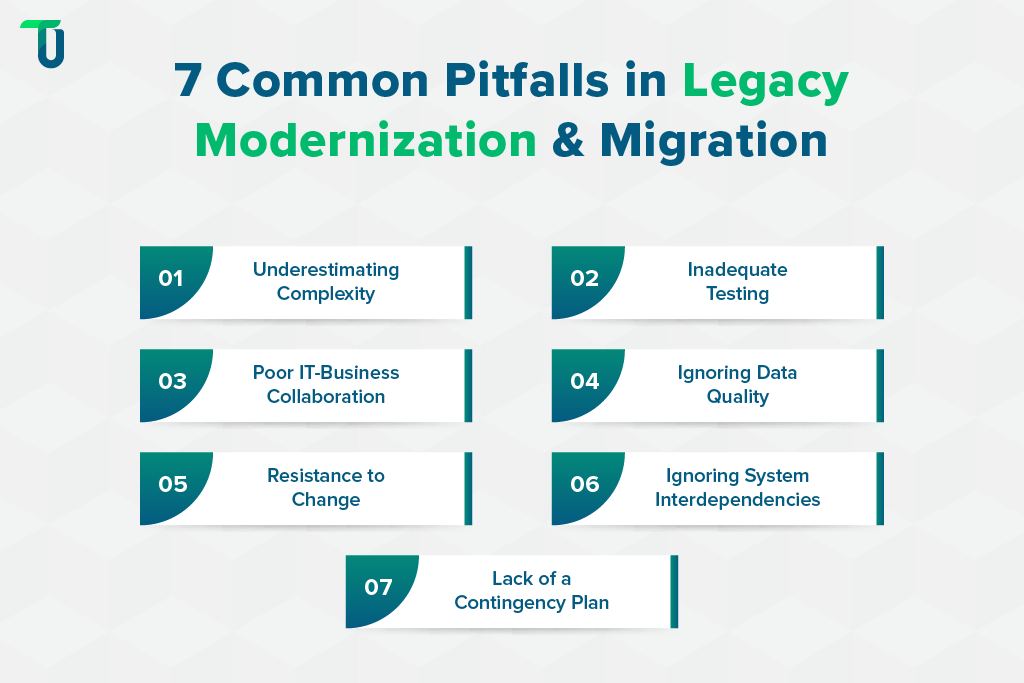
1. Underestimating Project Complexity
Legacy systems accumulate undocumented logic, custom integrations, and technical debt over years of incremental changes. Teams that scope a modernization program based on a surface-level review of the system consistently encounter budget overruns and timeline failures when the hidden complexity surfaces mid-project. A detailed system analysis, covering architecture, data flows, and all integration points, must precede any vendor selection or timeline commitment.
2. Inadequate Testing of New Systems
Skipping or rushing testing phases leads to data loss, downtime, and integration failures that could have been caught before production. Engineers and business users both must extensively validate the new environment before legacy systems are decommissioned. This means sandbox testing with real workloads, automated regression checks, and user acceptance testing that involves the teams who depend on the system daily, not just the IT team that built it.
3. Poor Collaboration Between IT and Business Teams
Technical teams understand the architecture. Business teams understand the workflows. When these two groups plan independently, the result is a technically sound migration of the wrong processes. Cross-functional alignment, starting from the assessment phase and continuing through go-live, prevents the most common form of modernization failure: delivering what was specified rather than what was actually needed.
4. Ignoring Data Quality Issues
Migrating uncleaned, duplicated, or inconsistent legacy data into a new system embeds those quality problems into the new environment permanently. Data cleansing, normalization, and quality validation must happen before migration, not after. Define data quality standards as part of the migration plan and enforce them with automated tooling rather than manual review.
5. Resistance to Change
Organizational Change Management (OCM) failures are more often the cause of low adoption than technical failures. Users who weren't consulted during design, weren't trained before go-live, or don't understand why the change is happening will find workarounds that undermine the new system's value. Drive adoption through early involvement, contextual training, and clear communication of what the change means for each team's daily work.
6. Forgetting System Interdependencies
Every system that connects to a legacy application must be identified before migration begins. Each of those connections needs to be rebuilt, reconfigured, or replaced in the new environment. Teams that discover these interdependencies post-cutover face unplanned rework that extends timelines by weeks and introduces production incidents that were entirely avoidable with a more thorough pre-migration dependency map.
TenUp's Take: In most engagements, interdependency failures aren't discovered through analysis. They're discovered when a downstream system stops working after cutover. The fix isn't better tooling. It's making dependency mapping a sign-off requirement before the migration plan is finalized, not a task within it. If a dependency map hasn't been reviewed and approved by both technical and business stakeholders, the migration plan isn't ready.
7. Lack of a Contingency Plan
Production incidents during migration are not a possibility to plan for. They are a certainty to prepare for. Disaster recovery procedures, rollback triggers, and escalation paths need to be documented and rehearsed before go-live, not drafted in response to an outage.
Understanding what goes wrong makes the framework question sharper: not which approach is easiest, but which approach the failure mode you're most exposed to makes inadvisable.
What Modernization Frameworks and Approaches Do Enterprises Use?
Choosing a modernization framework is not a technical decision. It is a risky decision. The framework you select determines which failure modes you're most exposed to, how long the program runs before it delivers measurable value, and what the organization's technical posture looks like five years after go-live. Getting this choice wrong is significantly more expensive than taking the time to get it right.
The most widely referenced enterprise modernization framework is the 7 Rs of cloud migration: rehost, replatform, repurchase, refactor, rearchitect, retire, and retain. Most enterprise modernization roadmaps map onto a subset of these seven paths regardless of which cloud provider is the target.
Replatforming vs. Refactoring: Which Costs Less Long-Term?
Replatforming moves a workload to a managed cloud environment with configuration changes but no code rewrite. The upfront cost is lower and the timeline is faster, but the technical debt in the original codebase migrates with it. Refactoring restructures that code to remove technical debt, which costs more upfront but reduces long-term maintenance burden and unlocks cloud-native performance improvements. The decision depends on how much of the system's value comes from its business logic versus its current architecture. If the logic is sound and the architecture is the problem, refactoring pays off. If both need to change, rearchitecting into cloud-native microservices is the more durable path.
Migrating Legacy Databases to Modern Platforms
Legacy database migrations to platforms like Amazon RDS, Azure SQL, or Google Cloud SQL require three steps executed in sequence:
- Schema mapping: Reconcile structural differences between source and target before any data moves.
- Controlled data transition: Use a proven migration pattern such as log-based replication, change-data-capture (CDC), or a carefully designed dual-write with reconciliation.
- Layered validation: Combine automated checksum verification with row-count checks, sample-based semantic validation, and business-rule-level audits (e.g., balances, referential integrity) before the legacy database is decommissioned.
Choosing Between Public, Private, and Hybrid Cloud
The right cloud model depends on your data residency requirements, compliance framework, and cost profile. Enterprises with stringent data sovereignty requirements or highly sensitive workloads often use a hybrid approach, keeping certain data on-premise while modernizing peripheral systems in the public cloud. For organizations evaluating supercloud and multi-cloud modernization strategies, the risk profile of each model needs to be mapped to the specific workloads in question rather than applied uniformly across the portfolio.
Best Tools and Platforms for Enterprise Legacy Modernization
No single tool or platform handles every aspect of an enterprise modernization program. The ecosystem breaks into three categories, and most programs draw from all three.
Cloud Platforms
AWS, Microsoft Azure, and Google Cloud are the dominant targets for enterprise legacy migration. Platform selection should follow workload requirements and existing licensing, not marketing preference.
- AWS: Broadest managed services catalog and most mature migration tooling, including AWS Application Migration Service and AWS Database Migration Service.
- Microsoft Azure: Default choice for enterprises already running Microsoft workloads; strong hybrid integration capabilities.
- Google Cloud: Particular strength in data and analytics modernization workloads.
System Integrators and Consulting-Led Delivery
For large-scale programs that span multiple business units and geographies, established system integrators (SIs) and specialized vendors often play a role alongside custom development partners:
- Accenture, Capgemini, Cognizant, Infosys, HCLTech: Broad delivery methodologies, large global teams, and extensive technology certifications across AWS, Azure, and Google Cloud. Typically engaged for enterprise-wide transformation programs where scale and multi-practice coordination are critical.
- IBM: Particular depth in mainframe and core-banking modernization, relevant for financial services and insurance organizations still running COBOL-based core systems.
- Specialized legacy-modernization vendors (e.g., Kodesage): Focused on AI-powered code understanding and structured legacy code transformation, often used as tooling or accelerators within a broader program rather than as the primary delivery partner.
Custom Development Partners
Large SIs deliver breadth. Custom development partners like TenUp Software Services deliver depth on a specific program's requirements. For enterprises that need dedicated teams, tight integration with internal engineering, and a partner accountable for outcomes rather than deliverables, a custom development partner operating as an extension of the internal team is often more effective than a generalist consultancy managing a fixed-scope engagement.
The tool and partner category decisions made here determine the ceiling of what the program can deliver. Getting the category right matters more than getting the vendor right within a category.
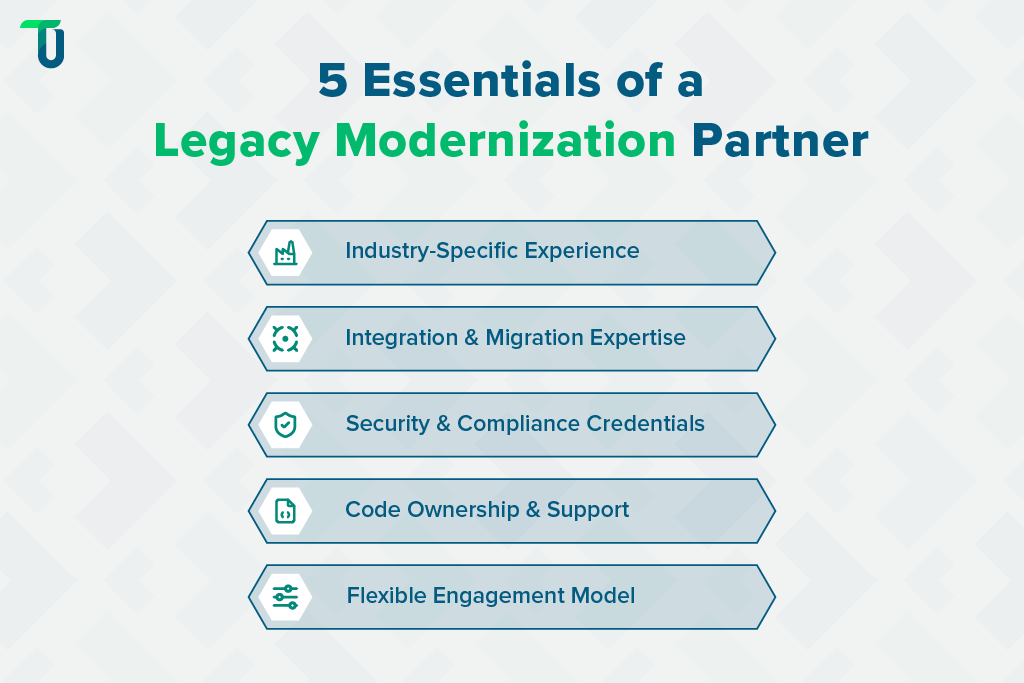
How to Choose the Right Legacy Modernization Partner
The right partner is not the one with the longest client list. It's the one whose engagement model, technical depth, and security credentials match what your program actually requires.
Check for Industry-Specific Modernization Experience
A partner who has modernized systems in your sector understands the compliance constraints, data sensitivity requirements, and operational continuity expectations that a general-purpose team discovers expensively mid-project. Ask for specific examples of engagements in your industry, not just references to sectors they've worked in.
Verify Integration Depth, Not Just Cloud Credentials
Cloud certifications confirm platform knowledge. They don't confirm the ability to untangle legacy integration complexity. Ask how the partner approaches dependency mapping, what tooling they use for static analysis, and how they handle integration failures discovered after migration begins. A partner who has a clear answer to these questions has done this before. A partner who doesn't have a methodology that looks complete on paper.
Confirm Security and Compliance Posture
For any partner handling regulated data, ISO 27001 certification is the baseline for information security management. AWS Partner status confirms validated cloud delivery capability. These credentials aren't differentiators. Their absence is a disqualifier.
Clarify Code Ownership and Post-Migration Support Terms
Full source code ownership after delivery, clear SLA terms for post-migration support, and explicit documentation of all custom modules and integrations are contract requirements, not negotiating points. A partner unwilling to commit to these terms is creating dependency by design.
Clarify the Engagement Model Before Signing, Not After
For enterprises evaluating global IT outsourcing models, post-migration managed services, and ongoing optimization support, the engagement model question matters as much as the delivery model. Confirm whether the partner offers dedicated teams, staff augmentation, or hybrid models, and which model fits your internal team's capacity and control requirements.
Post-migration support is where many programs lose value. Confirm SLA terms for uptime, issue resolution response times, and ongoing optimization before signing. The transition from project delivery to operational support is where partner accountability most frequently disappears.
Why Choose TenUp for Legacy Modernization Services
The business risk of getting legacy modernization wrong is higher than the cost of doing it right the first time. TenUp's approach centers on three principles:
- Pre-migration assessment first: no architecture decisions are made before the full dependency and complexity picture is established
- Phased delivery: methodology is validated in the pilot before it scales across the program
- Full code ownership at every milestone: the client holds the code at each project stage, not just at final delivery
Our work demonstrates this in practice:
Port Operations Digitalization: We modernized the legacy systems of a leading marine services provider by automating job planning, resource allocation, and billing. The result was measurable improvement in operational efficiency, transparency, and manual error reduction across the platform.
Warehouse Management System Consolidation: A global private equity firm needed to unify multiple Warehouse Management Systems across US and European portfolio companies. TenUp executed a legacy system migration that enabled centralized data integration, real-time inventory tracking, and role-based access management across the portfolio.
TenUp Software Services is ISO 27001 certified and an AWS Partner. For enterprises that need a modernization partner accountable for outcomes, not just deliverables, explore TenUp's digital transformation services or connect with our team to discuss your program.
Considering a legacy modernization initiative?
TenUp begins every engagement with a structured assessment to identify risks, dependencies, and the right modernization path before implementation.
Frequently asked questions
What is the difference between legacy system modernization and migration?

Migration moves applications to a new environment without necessarily changing how they work. Modernization improves the system itself through refactoring, rearchitecting, or adding modern integration layers. In most enterprise programs, migration is the path and modernization determines what arrives at the destination.
What are the biggest challenges in legacy system migration?
Undocumented dependencies, poor data quality, unmapped integration failures, and organizational resistance. All four are avoidable with a thorough pre-migration assessment and a structured OCM plan in place before the program begins.
How long does it take to migrate a legacy application to the cloud?
Simple applications can migrate in weeks. Enterprise-grade systems with regulated data and complex integrations typically take six to twelve months. A phased approach compresses overall timelines by surfacing methodology gaps in the pilot before they surface at scale.
What KPIs prove that a legacy modernization project was successful?
Track three layers: technical (MTTR, uptime, transaction speed), operational (deployment frequency, infrastructure cost, security incidents), and business (revenue growth, time to market, customer satisfaction). A program that moves technical metrics without shifting business KPIs has not solved the underlying problem.
What do legacy modernization projects typically cost?
Rehosting starts at $30,000-$100,000. Replatforming sits higher depending on configuration complexity. Refactoring and rearchitecting for cloud-native microservices can reach $500,000 to $1.5M or more. The more important question is the ongoing cost of not modernizing: maintenance, security exposure, and competitive lag.
How do you choose a legacy modernization service provider?
Require industry-specific compliance experience, structured dependency mapping, ISO 27001 certification, AWS Partner status, full code ownership terms, and clear post-migration SLAs. Ask how they handle integration failures discovered after migration begins. That answer separates experienced teams from those with untested methodologies.
Are there real-world examples of successful legacy modernization?
TenUp has two published engagements: Port Operations Digitalization, which automated legacy marine services workflows, and WMS Consolidation, which unified warehouse management systems across a global private equity portfolio. Both case studies detail the approach and outcomes.
Can a software development partner modernize a legacy system into cloud-native microservices?
Yes, through refactoring or rearchitecting. The existing application is restructured into modular, independently deployable services while preserving core business logic. It is the highest-effort approach and requires a partner with deep experience in both the source architecture and the target cloud-native environment.
What are the most common challenges in legacy database modernization?
Schema incompatibility, data quality issues that surface only after migration, and downtime risk during cutover. Address them with pre-migration field-level mapping, a dual-write strategy during the transition window, and automated checksum verification before decommissioning the source database.
Share the Article


